
An Administrative Assistant resume should show how you keep work moving when schedules change, priorities compete, and people need timely support. Show that you can coordinate calendars, prepare meetings, maintain documents, process routine expenses, communicate professionally, and handle sensitive information with discretion.
Tailor the resume to the environment. A department assistant may emphasize office systems, vendor coordination, and team service, while leadership support may highlight complex scheduling, travel, board materials, and confidential correspondence. This guide covers broad administrative work, not clinical scheduling, patient records, or other medical-office responsibilities.
Administrative Assistant Hiring Priorities
Hiring teams look for reliable coordination and judgment. Make clear who or what you supported, the workflows involved, and how you maintained follow-through. Instead of “managed office duties,” name the recurring processes you owned or helped improve.
Show calendar complexity where relevant: meetings across time zones, attendee confirmations, room reservations, agendas, and conflict resolution. Meeting support may include materials distribution, action-item tracking, virtual setup, and follow-up.
Discretion matters when you handle personnel documents, leadership correspondence, financial records, or planning materials. Name the information category without exposing it. “Maintained restricted leadership files in accordance with internal procedures” is clearer and safer than a vague trustworthiness claim.
What employers look for in administrative support
- Hiring signal
- Clear proof that you can coordinate competing requests, maintain accurate records, and communicate with appropriate discretion.
- Evidence to show
- Name the workflow, stakeholders, tools, and follow-through step, such as scheduling, agenda preparation, travel reconciliation, document routing, or action-item tracking.
For early screening, use an ATS-friendly resume guide and familiar section names.
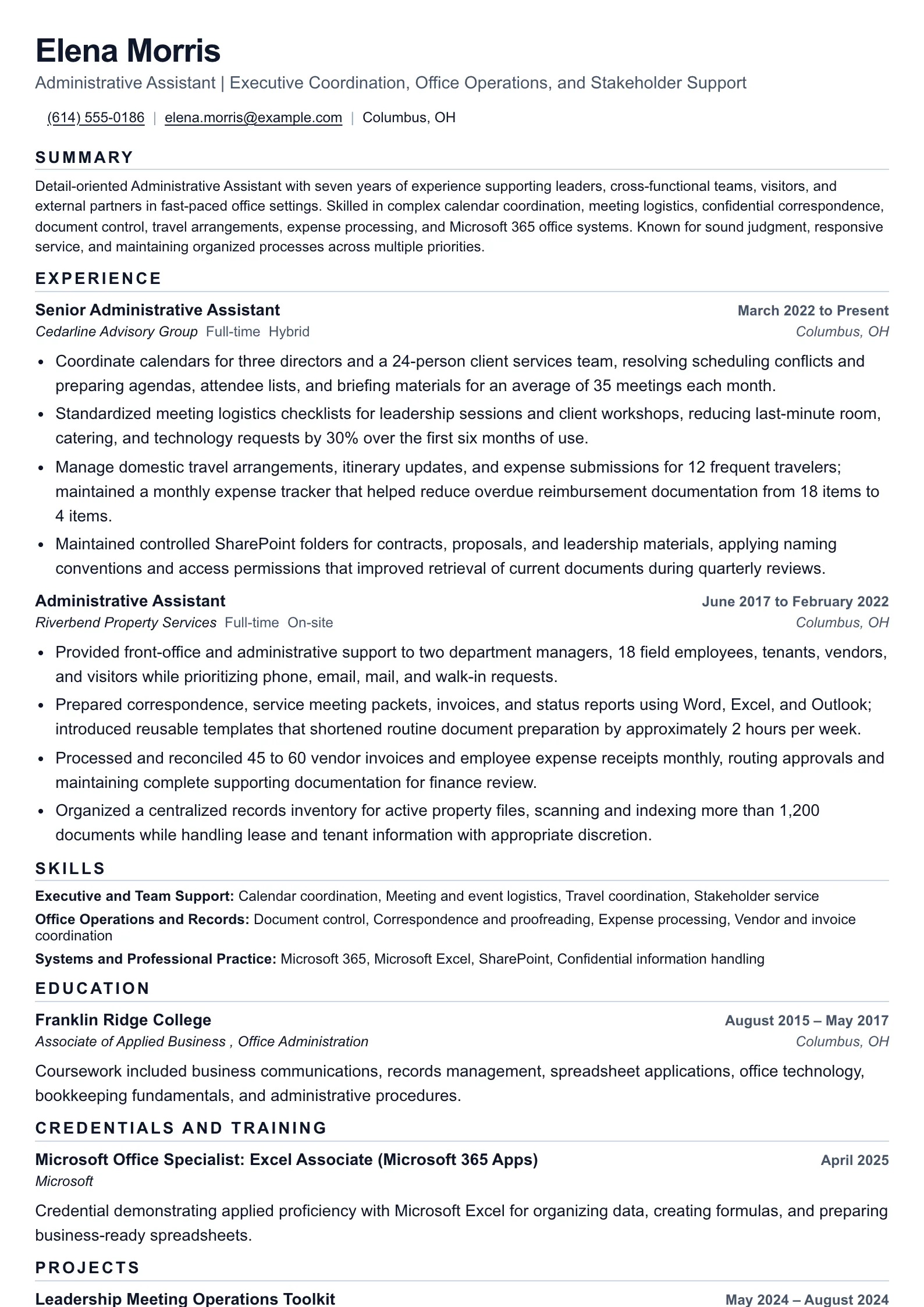
Administrative Assistant resume for coordinated office support
Present calendar management, meeting logistics, document control, travel coordination, expense processing, and stakeholder service in a focused format.
Administrative Assistant Skills That Need Evidence
Skills are strongest when connected to a workflow. Calendar management may involve Outlook or Google Calendar, prioritization, recurring events, attendee coordination, and deadline reminders. Meeting logistics can include rooms, video links, agendas, presentation materials, and post-meeting follow-up.
Document control may include version tracking, file naming, secure storage, retrieval, approval routing, and employer retention practices. Describe the process you followed rather than implying you created policy. For correspondence, show that you drafted, edited, routed, or responded using the organization’s expected tone and approval process.
Be specific about travel and expenses. You may have assembled itineraries, booked transportation and lodging under company guidelines, communicated changes, collected receipts, checked coding fields, or submitted reports for review. Approval authority, spending limits, and systems vary, so represent your role accurately.
Coordination
- Calendar management
- Meeting logistics
- Travel arrangements
- Deadline tracking
Information Management
- Document control
- File organization
- Data entry
- Records retrieval
Communication and Service
- Professional correspondence
- Stakeholder support
- Phone and email triage
- Follow-up
Office Systems
- Microsoft 365
- Google Workspace
- Scheduling tools
- Expense platforms
Administrative Assistant Achievement Bullets
Strong bullets show the action, administrative context, and observable result. Use numbers when you have reliable records, but not every accomplishment needs them. Explain how your work improved readiness, accuracy, response time, access to information, or consistency within your assigned scope.
Use verbs that fit the work: coordinated, consolidated, prepared, maintained, reconciled, routed, tracked, scheduled, drafted, organized, or supported. Add the people, process, tools, or deliverable involved.
Action
Action + administrative workflow + scope or tools + observable result
Method
Coordinated weekly leadership meetings through Outlook, prepared agendas and shared files, and tracked follow-up items so attendees received materials before each session.
Result
State the verified scope, quality, timing, or service result without presenting an illustrative metric as a benchmark.
Documented metrics can add context. For example: “Reorganized shared contract files using a consistent naming convention and access structure, reducing the time needed by the team to locate current documents.” Do not invent a percentage or claim a company-wide efficiency gain.
For more guidance, review strong resume bullet points. Keep bullets credible by distinguishing your work from decisions, approvals, or outcomes owned by managers, finance teams, or other departments.
Administrative Assistant ATS Keywords
Use terms from the posting, especially those tied to its systems and support model. A department assistant role may request office administration, records management, invoice tracking, event coordination, and customer service. A leadership support role may emphasize executive calendars, board materials, travel arrangements, expense reports, confidential correspondence, and cross-functional coordination.
Place relevant terms naturally in your summary, skills, and experience bullets. If a posting requests document management, identify the repository, routing process, or version-control practice you used when applicable.
Read this overview of resume keywords before tailoring. Match official software names carefully, including Microsoft Outlook, Excel, PowerPoint, Teams, Google Workspace, Concur, SharePoint, DocuSign, Zoom, or platforms named in the vacancy. Only include tools you have actually used.
Administrative Assistant keywords to tailor
- calendar coordination
- meeting logistics
- travel arrangements
- expense reports
- document control
- confidential correspondence
- office administration
- stakeholder support
- Microsoft 365
- records management

Turn coordination into proof
Describe one recurring request, the system you used to organize it, the stakeholders involved, and how you confirmed completion. Demi can help shape those details into a concise bullet without overstating authority.
Seniority on an Administrative Assistant Resume
An early-career Administrative Assistant can emphasize dependable execution: scheduling routine meetings, preparing documents, maintaining files, updating trackers, and following office procedures. Internships, temporary assignments, volunteer coordination, and customer-facing work can be relevant when they demonstrate transferable administrative habits.
An experienced assistant should show broader ownership of recurring systems, such as supporting multiple leaders or teams, managing complex calendars, coordinating travel changes, improving templates, maintaining centralized records, or onboarding colleagues to office processes. Clarify whether you made recommendations, prepared materials, or held formal approval authority.
Senior administrative professionals may support higher-stakes schedules, sensitive communications, cross-functional planning, or department operations. Show judgment, prioritization, process improvement, and trusted stakeholder service, but do not imply executive decision-making authority unless it was explicitly part of the role.
Match administrative requirements to credible proof
| Job requirement | Matching evidence | Keyword |
|---|
Administrative Assistant Resume Mistakes
Avoid relying only on traits such as “organized,” “detail-oriented,” or “people person.” Replace them with evidence from scheduling, records, correspondence, meeting preparation, expense processing, or service recovery.
Do not list software without context. If Excel, Outlook, SharePoint, or a travel platform matters, show how you used it. “Maintained a shared Outlook calendar and meeting invitations” is stronger than a standalone tools list.
Protect confidential information. Do not include private travel details, executive names, account information, restricted project content, or personnel matters. Avoid claiming independent approval of expenses, contracts, or records unless that responsibility was assigned to you.
Turning a vague duty into administrative evidence
- Why it hurts
- Responsible for scheduling meetings, answering emails, and organizing files.
- Better approach
- Coordinated recurring and ad hoc meetings, drafted and routed correspondence for review, and maintained a searchable shared-file structure for current departmental materials.
Frequently asked questions
- What should an Administrative Assistant resume emphasize?
- Emphasize the administrative systems you support, such as calendar coordination, meeting logistics, correspondence, document control, travel, expense processing, office operations, and service to internal and external stakeholders.
- How can an Administrative Assistant show achievements without inflated numbers?
- Describe the workflow, the scope of support, the tools used, and the observable result. For example, explain how you standardized meeting materials, improved record retrieval, or reduced incomplete expense submissions without claiming unsupported business-wide impact.
- Which software should an Administrative Assistant include on a resume?
- Include software you have used in a work setting and that appears in the target posting, such as Microsoft 365, Google Workspace, Outlook, Teams, Zoom, Slack, Concur, SharePoint, Dropbox, DocuSign, or a scheduling platform. Do not list tools you cannot discuss confidently.
- How should an Administrative Assistant address confidential information on a resume?
- Use careful, general language such as confidential correspondence, restricted records, executive scheduling, personnel files, or sensitive meeting materials. Avoid naming private individuals, exposing internal information, or overstating authority over records and approvals.
Ready to build your Administrative Assistant resume?
Choose sample data or build your own resume, then personalize it before you download.