How Many Bullet Points Per Job on a Resume? A Clear Guide by Experience Level
Learn how many bullet points per job to include on your resume. Use the 3-6 rule, adjust by experience level. Write stronger bullets with examples and formulas.
How Many Bullet Points Per Job on a Resume? A Clear Guide by Experience Level
Introduction
Unsure how many bullet points per job can make a resume feel either crowded or too thin. Too few bullets hide your strongest work, while too many bullets dilute impact and turn simple sections into a wall of text. The right count depends on the role, the career stage, and how much measurable achievement each job can support.
This guide shows how to choose the right number of resume bullet points per job, when to use more or fewer, and how to keep each line focused. It also covers where bullets work best, how to make them stronger with action verbs and metrics, how to align them with ATS keywords, and how to rewrite weak lines so they read clearly and scan fast.
How Many Bullet Points Per Job on a Resume?
If you’re asking how many bullet points per job on resume, use 3-6 bullets for most roles. That is enough to show what you did well without making the section feel crowded. The exact number should depend on how relevant and recent the job is, not on a fixed rule you apply to every entry.
For example, a current operations role might need 5 bullets if you manage scheduling, reporting in Excel, vendor coordination, and process updates, while a part-time campus job from several years ago may only need 2 bullets. This keeps your resume bullet points per job focused on the experience that supports your target role. In practice, resume bullet count by experience should increase when the job is both recent and closely related.
A common mistake is stretching every role to the same length, which creates weak bullets and a cluttered page. Instead, stop when you have covered the strongest contributions clearly. If a bullet repeats information, sounds vague, or adds no new value, cut it. That simple rule makes it easier to decide how many bullets per job without overthinking each entry.
The Best Bullet Count by Experience Level
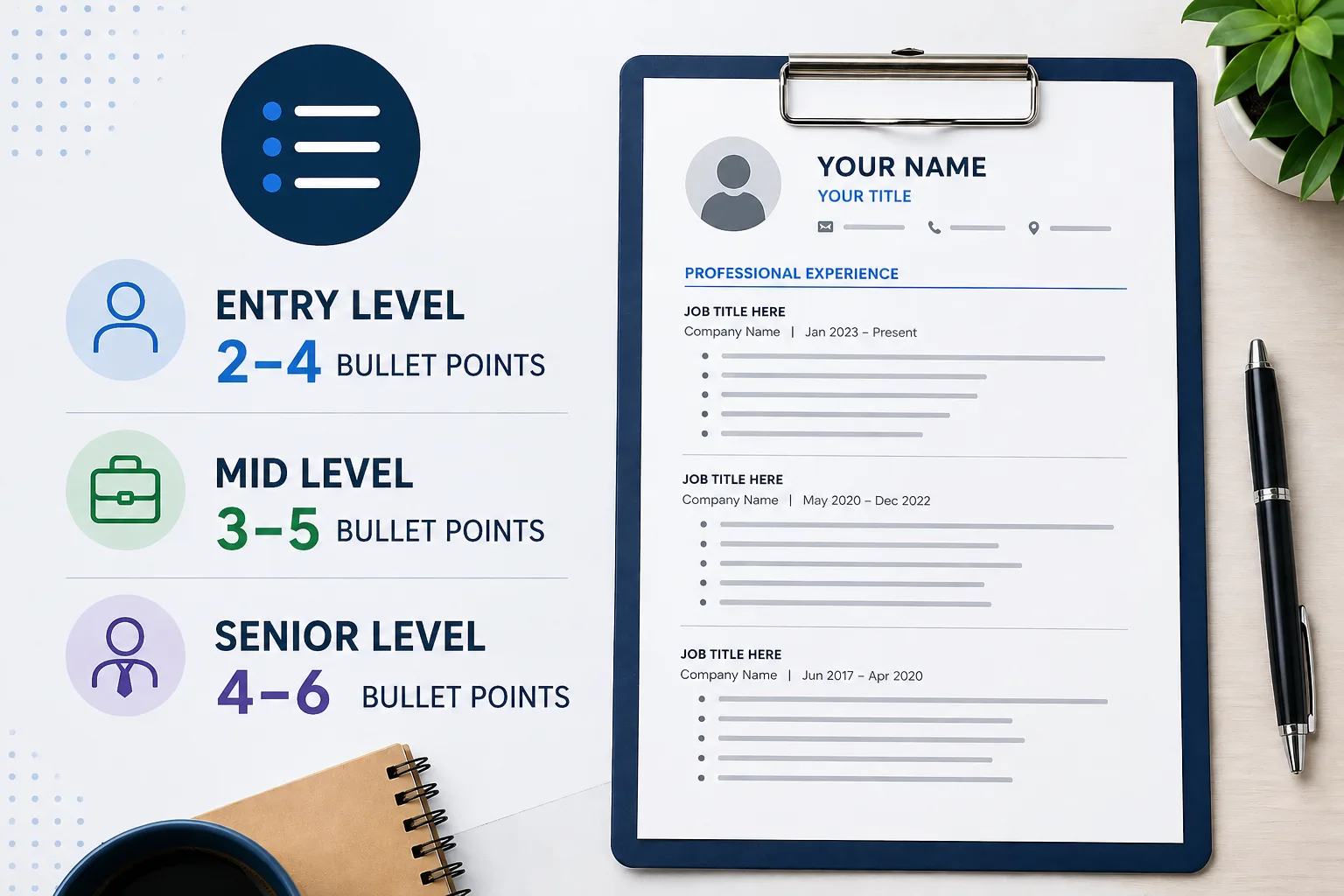
Bullet count should grow with responsibility, not just with time in the workforce. Early roles usually need fewer bullets because the scope is narrower. As your experience expands, you need more room to show leadership, ownership, and results that matter to the target role.
For entry-level roles, 2-4 bullets is often enough, especially for internships, campus jobs, or assistant positions. Mid-career candidates can usually use 3-5 bullets to highlight their strongest wins. Senior candidates may need 4-6 bullets for major roles that include leadership, planning, or systems work. For example, a senior operations manager using NetSuite and Tableau may need extra space to show budgeting, team oversight, and reporting responsibilities in one role.
One pattern to avoid is giving every job the same number of bullets, no matter the level or relevance. Decide how many bullet points per job for entry level resume, mid-career, or senior roles based on scope and fit. Lead with your most important contributions, cut routine tasks, and stop before the section starts to feel repetitive.
How Many Bullets for Recent Roles vs Older Roles?
Recent and relevant roles deserve the most detail because they do the most work on your resume. Older positions usually need less space unless they directly support the job you want now. The goal is to show progression without giving equal weight to every past role.
A current or recent role can support 4-6 bullets when the work clearly matches your target job. For example, a customer success manager job from the last year might include five bullets covering onboarding, account reviews, issue tracking in Zendesk, and renewal support. A support role from eight years ago may only need one or two bullets, or a short summary line. If you are asking, is 6 bullet points too much for a resume, it is not too much when each bullet adds distinct value.
What hurts most is keeping long bullet lists under older, less relevant jobs. To avoid too many bullet points on resume pages, trim routine tasks, combine overlapping points, and save detail for the experience that strengthens your case. That makes your strongest qualifications easier to spot right away.
Why Bullet Points Matter More Than Paragraphs
Paragraphs make resume details harder to scan because they pack too much information into one block. Bullet points separate ideas, so the reader can find tools, responsibilities, and results without slowing down. That makes them the better choice for most experience sections.
Each bullet should carry one clear idea. A data analyst, for example, can use separate bullets for building dashboards in Tableau, cleaning data in SQL, and presenting weekly reports to leadership. In paragraph form, those details blur together and are easier to miss. This is one of the most practical resume bullet point best practices: break experience into short, distinct points that can be understood quickly.
Many job seekers try to sound more polished by writing a full paragraph under each role. In practice, that usually makes the resume look dense and unfocused. Use bullets for achievements and responsibilities, keep each one concise, and remove filler phrases. Once the layout is easier to scan, the rest of the resume becomes easier to organize.
Where to Use Bullet Points on a Resume
Bullet points work best in sections where the reader needs to scan details quickly. That usually means work experience first, then projects, and sometimes education if you need to show coursework, honors, or leadership. Simpler sections should stay compact so the page does not feel crowded.
A practical resume formatting approach is to use bullets where proof matters most. Under Experience, list 3–5 bullets for each role. Under Projects, use 2–3 bullets to show tools and outcomes, such as Python, SQL, or Figma. Under Education, add bullets only when they strengthen your case, like a capstone project or academic award. Certifications usually work best as a single line. This setup improves resume readability because each section gets the amount of detail it actually needs.
A weak resume often uses bullets everywhere, even when the content is simple. Instead, match the format to the section’s purpose. Use bullets when they help the reader understand impact fast, and keep straightforward sections short so the most important experience stands out.
Section-by-Section Bullet Rules
Resume bullet point best practices change by section, so do not treat the whole resume the same. Experience should carry the most bullets because it proves fit. Education, projects, certifications, and extras need a lighter touch to protect resume readability and keep the page balanced.
Use this simple section matrix: Experience: 3–6 bullets for key roles; Education: 0–2 bullets for honors, coursework, or leadership; Projects: 2–4 bullets when the work shows tools or outcomes; Certifications: usually no bullets unless you need one short detail; Summary: bullets only if you keep it to 2–3 sharp lines. Example: under a data project, you might use two bullets to show Python, SQL, and a Tableau dashboard, while the certification line stays as "Google Data Analytics Certificate" with no extra text. That is stronger resume formatting than adding bullets everywhere.
A common mistake is using the same bullet style and volume in every section, which makes the resume look crowded. Instead, give the most space to experience, keep education compact, and use bullets only when they add useful detail. If you are unsure how many bullets per job or section, start lean and add only what improves clarity.
Where Not to Use Bullet Points
Not every part of a resume needs bullets. In compact sections, bullets can waste space, stretch short information into multiple lines, and make the layout feel heavier than it needs to be. Clean formatting matters more than forcing every section into the same style.
A skills section, for example, is usually stronger as “Excel, SQL, Tableau, Jira” than as four separate bullets. A summary also works better as two tight lines than as a stacked list of short phrases. On a one-page resume, especially for early-career candidates, that saved space can be used for stronger experience content. Good resume formatting keeps the page compact and easy to follow.
One easy mistake is adding bullets simply because a section contains information. Use them only when they improve resume readability and help the reader find useful detail faster. If a section can be grouped, labeled, or written in one line, keep it that way and reserve bullets for sections that need real explanation.
Quick Decision Tree: Should This Section Use Bullets?
Use a simple test before adding bullets: does this section need explanation, or does it just need clean structure? If the reader needs to scan multiple details, bullets usually help. If the content is short and self-explanatory, bullets often add clutter instead of clarity.
Apply that rule by section. Header: no bullets, just name, title, and contact details. Skills: usually no bullets; group items like “Excel, Power BI, SQL” on one line. Summary: use bullets only if each point adds something distinct and you can keep the section very short. Experience and projects usually need bullets because they carry tools, actions, and outcomes. On a one-page resume, skipping bullets in the summary can free up space for stronger job content.
A common mistake is using bullets to fill space rather than to improve understanding. Before adding them, check whether the format makes the section faster to read. If not, keep it in a clean line or short paragraph and save bullets for the sections where detail matters most.
What Makes a Resume Bullet Point Strong?
If you want to know how to write strong resume bullet points, focus on three parts: action, context, and result. A strong bullet starts with a clear verb, shows what you worked on, and explains what changed because of your work. That structure is easier to trust than a vague duty statement.
For example, instead of writing "Responsible for monthly reporting," write: "Built monthly performance reports in Excel for three department leads, cutting manual update time by 4 hours each month." This works because it uses action verbs, gives context, and shows measurable achievements without sounding inflated. It also tells the reader what tool you used and why the work mattered.
A common mistake is listing responsibilities with no outcome, such as "Handled customer emails" or "Managed schedules." Those bullets describe activity, not value. To improve them, ask yourself three questions: what did I do, in what setting, and what changed after I did it? Use the answers to rewrite each bullet with specific details. Once that pattern feels natural, building stronger bullet formulas becomes much easier.
If you're still building your resume from scratch, it helps to understand how bullet points fit into the bigger picture. This guide on overall resume structure and strategy explains how to organize your experience, format sections, and make your resume easier to scan.
Resume Bullet Formulas That Actually Work
Writing bullets gets easier when you use a formula instead of starting from scratch each time. A good formula gives you a repeatable structure, helps you stay concise, and makes it easier to match the bullet to the kind of work you did. That is especially useful when you are trying to describe analysis, leadership, or project delivery clearly.
Two practical options are XYZ for analytical work and CAR for leadership-focused work. XYZ works well when you want to show “accomplished X, measured by Y, by doing Z.”
Example
Reduced monthly reporting errors by 18% by cleaning data in Excel and automating checks in Power Query.
CAR works well for management roles: context, action, result.
Example
“Led a hiring sprint during peak season, rebuilt interview scheduling in Greenhouse, and filled 12 roles in six weeks.” You can also keep a short action verb list by function: sales—grew, closed, expanded; engineering—built, optimized, debugged; operations—streamlined, coordinated, improved; HR—recruited, onboarded, retained.
The main mistake is treating one formula as a template for every bullet. Instead, pick the structure that best fits the result you want to show. Start with the strongest outcome, add the action that created it, and keep the line easy to scan.
Which Formula to Use for Metrics, Projects, Leadership, or Career Changes
The best resume bullet formula depends on the kind of work you did, not your job title alone. If your background is heavy on measurable achievements, use a structure that puts numbers first. If your experience centers on projects, team decisions, or career stage shifts into leadership, pick a formula that shows context and outcome clearly.
Use XYZ for analytical roles: “Accomplished X, as measured by Y, by doing Z.”
Example for an analyst
Reduced Tableau dashboard load time by 38% by rewriting SQL queries and removing redundant joins.
Use CAR for leadership or problem-solving: Challenge, Action, Result.
Example for a manager
Resolved a 3-week onboarding backlog by redesigning approval steps, cutting time-to-productivity by 6 days.
Use PAR for project-based work: Problem, Action, Result. Strong action verbs also vary by function: sales—negotiated, expanded, closed; engineering—built, automated, optimized; operations—streamlined, coordinated, standardized; HR—recruited, coached, implemented.
A common mistake is forcing one formula into every bullet point, which makes resume bullet point best practices harder to follow and can make bullets too long. Choose the formula that fits the scenario, then keep each bullet focused on one result. If a bullet has no metric yet, write the structure first and add the number after.
How to Add Metrics and Quantify Results
Many job seekers know they need measurable achievements but get stuck when they do not have exact percentages or revenue figures. The fix is to quantify impact in other ways: volume, scope, frequency, timeframe, team size, or turnaround time. This makes bullet points more credible and improves resume readability because the result is easier to scan.
Start with a strong action verb, then add a number that shows scale or pace. For example: “Processed 120+ weekly invoices in NetSuite with under 1% error rate while supporting 4 business units during a system migration.” Even without a revenue metric, that bullet proves workload, accuracy, tool use, and business context. This is one of the most useful resume bullet point best practices because it turns a task into evidence.
A common mistake is listing responsibilities without context, such as “Handled employee onboarding” or “Managed reports.” Instead, ask: how many, how often, how fast, for whom, and using what tool? Rewrite each bullet with at least one concrete detail, even if it is not a percentage. Once your bullets show clear scope and results, it becomes much easier to match them to the language employers use in job descriptions.
How to Align Bullet Points With ATS Keywords
ATS keywords should match the job description, but the bullet still needs to sound like a person wrote it. The goal is to mirror the employer’s language where it matters, while keeping resume readability high and the meaning clear. Good resume bullet point best practices balance keyword alignment with specific results.
One practical way to check whether your bullets actually match the job description is to use Democruit’s ATS Resume Checker. It compares your resume against the role and highlights missing keywords, so you can adjust your bullet points without guessing or overloading them with repetitive terms.
For example, if a posting asks for “inventory forecasting” and “vendor coordination,” rewrite a vague bullet like “Managed supply tasks” into “Improved inventory forecasting in Excel and coordinated with 12 vendors to reduce stockouts during peak demand.” The keywords fit naturally, and the bullet still explains the work. That kind of resume formatting also helps ATS parse the content cleanly.
A common mistake is stuffing the same ATS keywords into every bullet or using graphics, columns, and text boxes that break parsing. Use simple formatting, standard headings, and one idea per bullet. Before you submit, scan the job description, pick the most relevant terms, and revise only the bullets that support them. That keeps your resume targeted without sounding robotic.
ATS-Safe Bullet Examples Before and After Keyword Alignment
A bullet can describe real work and still miss the mark if it does not reflect the language in the job description. Adding ATS keywords improves relevance, but the bullet should still read naturally and support resume readability. The goal is not to copy phrases blindly. It is to match the employer’s terms where they accurately describe your work.
Example from an operations role
Before — Handled purchasing and supplier communication.
After — Coordinated procurement activities in SAP and managed supplier communication for 25+ active purchase orders per week.
If the posting uses “procurement,” “supplier management,” and “SAP,” the revised version is easier for both ATS and human readers to understand. For resume formatting, keep bullets in a standard single-column layout with simple round bullets, clear job titles, and no text boxes or tables.
A common mistake is adding ATS keywords in a list-like way, which makes bullets robotic, or using design-heavy formatting that breaks parsing. Use exact terms only when they fit your experience, and place them inside accomplishment-focused bullets. Before submitting, compare each bullet to the posting and ask: does this line show the skill, the tool, and the result in plain language? That review also makes weak bullets easier to spot and fix. After rewriting your bullets, it helps to validate them against the job posting.
Common Resume Bullet Mistakes to Avoid
Knowing how to avoid too many bullet points on resume pages starts with cutting lines that repeat the same idea. Too many bullets, especially long ones, reduce resume readability and make the page look crowded. The goal is to keep each role grouped, clear, and easy to scan.
A common mistake is writing four bullets that all say the same thing in different words, such as “managed reports,” “created reports,” and “updated reports.” A better version is one focused bullet: “Built weekly sales reports in Excel for a 12-person team, reducing manual updates by 2 hours per week.” That follows resume bullet point best practices because it combines action, tool, and result without filler. In a hiring tool like Greenhouse, concise bullets also display more cleanly in preview screens.
If a bullet does not add a new skill, metric, or outcome, remove it or merge it with another line. Use simple resume formatting, keep related points together, and trim anything that makes the section feel repetitive. That is the fastest way to keep your resume sharp instead of overloaded.
How to Rewrite Weak Bullet Points
Improving bullet wording starts by turning duties into outcomes. If a bullet only says what you were assigned, it does not show why your work mattered. Strong resume bullets use action verbs, specific context, and measurable achievements whenever possible.
For example, rewrite “Responsible for customer support emails” into “Resolved 45-60 customer support emails per day in Zendesk, improving first-response time by 30%.” The change is simple: the weak version names a duty, while the stronger version shows volume, tool, and result. If you are using AI, prompt it with: “Rewrite this resume bullet into an achievement statement with a stronger verb, one metric, and clear context: [paste bullet].” That is one of the fastest ways to learn how to write strong resume bullet points.
If rewriting each bullet feels slow or repetitive, tools like Democruit’s AI Resume Builder can help speed up the process. Instead of starting from scratch, you can paste a basic duty and turn it into a structured achievement with stronger verbs, clearer context, and measurable results in seconds—then refine it to match your exact experience.
A common mistake is adding buzzwords without proof, such as “helped improve operations” or “supported team goals.” Instead, rewrite one bullet at a time and ask what changed because of your work. If you are early in your career, use scope or frequency; if you are senior, emphasize business impact and leadership. That keeps the bullet honest, specific, and easier to scan.
If you're working with limited experience, rewriting bullets can feel harder because you may not have clear metrics or formal job history. In that case, this guide on how to build a resume without experience shows how to turn projects, coursework, and small responsibilities into strong, result-focused bullet points.
Before-and-After Bullet Rewrites for Entry-Level, Mid-Level, and Senior Roles
The best rewrite depends on your career stage because employers expect different kinds of evidence at each level. Entry-level bullets should show volume, accuracy, or tools used. Mid-level bullets should show ownership and results, while senior bullets should show leadership, scope, and business impact.
Here is a practical set of rewrites. Entry-level: “Helped with scheduling” becomes “Coordinated interview scheduling for 20+ candidates per week in Google Calendar and Greenhouse.” Mid-level: “Managed project timelines” becomes “Delivered a 6-week CRM migration on schedule by coordinating 4 cross-functional teams.” Senior: “Led operations team” becomes “Directed a 15-person operations team across 3 sites, reducing order processing delays by 18%.” Each version improves bullet wording by replacing vague verbs with clearer action and measurable achievements. If you use AI, try: “Rewrite this resume bullet for a mid-level candidate using one strong verb, one scope detail, and one result.”
A common mistake is using the same style of bullet at every level, which can make a senior resume sound junior or an entry-level resume sound inflated. Match the bullet to your actual responsibility level, then check whether it shows action, context, and outcome. That makes it easier to build stronger examples for your target role.
Resume Bullet Point Examples by Job Type
Resume bullet points per job should match the work the role actually does. A marketing coordinator, software engineer, and HR specialist all need different proof, even if they use the same resume format. The strongest bullets use action verbs and measurable achievements that fit the function.
Examples
Marketing — Scheduled 18 email campaigns in HubSpot, lifting average open rate by 12%.
Engineering — Automated error checks in Python, reducing QA review time by 40%.
HR — Coordinated onboarding for 35 new hires in BambooHR, cutting paperwork delays by 3 days.
These examples follow resume bullet point best practices because they show the tool, the task, and the result in one line.
A common mistake is copying the same style of bullet across every job type, which makes the resume feel generic. Instead, choose the metric that matters most in your field: speed, volume, accuracy, conversion, or compliance. Then keep each bullet short enough to scan quickly and specific enough to prove impact.
Can AI Tools Help You Write Better Resume Bullets?
AI tools can speed up drafting, especially when you are stuck turning job duties into resume bullets. They are useful for brainstorming, improving bullet wording, and testing whether your lines sound clear and specific. The best results still follow resume bullet point best practices: use AI for ideas, then edit for accuracy and relevance.
For example, you can paste a vague line into ChatGPT and ask: “Rewrite this into a strong resume bullet with one action verb, one metric, and one ATS keyword: supported monthly reporting.” A better output might be: “Built monthly KPI reports in Excel for a 9-person sales team, reducing manual updates by 2 hours per week.” That approach helps you learn how to write strong resume bullet points while keeping the wording natural.
A common mistake is copying AI output without checking facts, which can create inflated claims or awkward phrasing. Use AI to generate options, then verify numbers, tools, and outcomes yourself. If the bullet still feels generic, ask for a version that matches your role level and target job. That keeps your resume accurate, readable, and ready for the final review. Tools like Democruit’s AI Resume Builder are especially useful here because they combine rewriting, keyword alignment, and formatting in one place. Instead of juggling multiple prompts, you can generate and refine bullet points while keeping them tailored to specific job descriptions.
Once your resume bullets are strong, the next step is making sure your application is consistent across documents. A well-written cover letter should reinforce the same achievements and keywords. This guide explains how AI tools can help you write tailored, high-quality cover letters faster.
Quick Recap: Resume Bullet Point Rules to Follow
If you are still wondering how many bullets per job to include, use 3-6 as the default range and adjust by relevance. The best resume bullet points are not the longest list; they are the ones that show measurable achievements clearly and keep the page easy to scan.
A simple rule is to give your most relevant role the most space. For example, a project manager might use five bullets for a current role, three for a previous role, and two for an older position, with each line starting with a strong action verb and a result. That keeps resume bullet points per job focused on impact instead of repetition.
A common mistake is packing every job with the same number of bullets or writing long, crowded lines. Instead, trim anything that does not support the target role, keep each bullet to one outcome, and make sure each role shows the clearest evidence first. That approach follows resume bullet point best practices and keeps the page readable from top to bottom.
Conclusion
The right number of resume bullet points is the number that proves impact without crowding the page. When each job has the right mix of measurable achievements, clear action verbs, and relevant detail, your resume becomes easier to scan and stronger to read.
Use one simple next step: review your current resume and cut or rewrite any bullet that does not show a result, a scope, or a clear reason it matters. That single pass will improve both the count and the quality of your bullets.
Once your resume is ready, staying organized during your job search matters just as much.